How to save recipes from Instagram reels and posts
Most Instagram recipes are in the caption, behind the bio link or sent by DM. Here's where to look, how to write down a reel, and how to save one.

To save a recipe from Instagram, tap the bookmark under the reel or post so it's in your Saved folder, and then track down the written recipe, which is usually in the caption or behind the link in the creator's bio. If it's only spoken in the reel, you can type it out while it plays, or send the reel to a recipe app and let it do the typing.
What Instagram's Save button does
Tap the bookmark under a post or a reel and it goes into Saved, on your profile. You can sort saved posts into collections, like "Weeknight" or "Baking", and Instagram says your saved posts are private to you.
A saved reel is still a video, though, so you're pausing it at the stove to catch each amount, and if the creator deletes the post, there's nothing left in your Saved to go back to.
Posts with photos are a bit easier, as the recipe is sometimes on one of the slides. Swipe through all of them before you screenshot anything, since the method is often on the last one.
Find the written recipe first
Instagram creators tend to write their recipes down somewhere, because people ask.
- Tap "more" on the caption. Long captions with the full ingredient list are normal on food accounts.
- If the caption says "recipe in bio" or "link in bio", open their profile and tap the link there. That usually goes to a page of links, with the recipe somewhere on it, often under the dish's name.
- If the caption says something like "comment RECIPE and I'll send it to you", the creator has set up an automatic reply, and commenting that word usually gets the link sent to your messages.
- Check the comments for one the creator pinned.
A recipe on the creator's site is better to cook from than the reel, because it's the complete version with measured amounts, so save that page if there is one.
If the recipe is only in the reel
Play the reel with your notes open and stop it every time something goes into the pan. Reels move fast, so expect to go back two or three times. Turn vague amounts like "a splash of cream" into a number you can repeat next time, and add what the camera shows but the voiceover skips, such as how thick the sauce is before it comes off the heat.
Creators outside the US often give amounts in grams, which you can turn into cups with the grams to cups converter. Put the reel's link at the top of your notes so you can rewatch one step when you need to.
Saving Instagram recipes on iPhone and Android
Instagram's Save button and your Saved folder work the same on both phones, and so does hunting down the written recipe. TikTok works much the same way, and we've covered how to save recipes from TikTok as well.
Tapas is an iPhone app. On an Android phone you can use it in your browser at tapas.cooking, but the web version can't open Instagram posts, so copy the caption and paste that into Import instead of the link.
Saving Instagram recipes for free
None of this needs a paid app. Saved and collections are free, a notes app is free, and Tapas is free with no paid tier. Some recipe apps limit free saves: ReciMe's website says its free version saves 5 recipes a week (checked 5 November 2026).
Saving an Instagram recipe to Paprika or ReciMe
- Paprika saves recipes from web pages, and its help pages don't mention Instagram. When the caption or the bio link leads to the recipe on a website, open that page and save it with Paprika's built-in browser or its Safari share extension. A recipe that's only in the reel has to be typed in by hand. There's more on how Paprika and Tapas differ in our Paprika alternative guide.
- ReciMe saves recipes from Instagram and TikTok, so you share the reel or post to ReciMe from Instagram's share button. On its free version, that counts toward the 5 a week.
How to save an Instagram recipe with Tapas
Tapas is the free iPhone recipe app we make, and you can save a reel to it straight from Instagram.
- On the post or reel, tap the Share button (the paper plane) and choose Tapas from your iPhone's share sheet. If you'd rather, copy the link, open Tapas, tap the + on your Cookbook and paste it into Import.
- Tapas reads the caption and listens to the reel on your iPhone, and when the caption sends you to the creator's website, it picks up the recipe there as well. You get it back written out with amounts and steps.
- Give it a quick read before you save, and change anything it missed or got wrong.
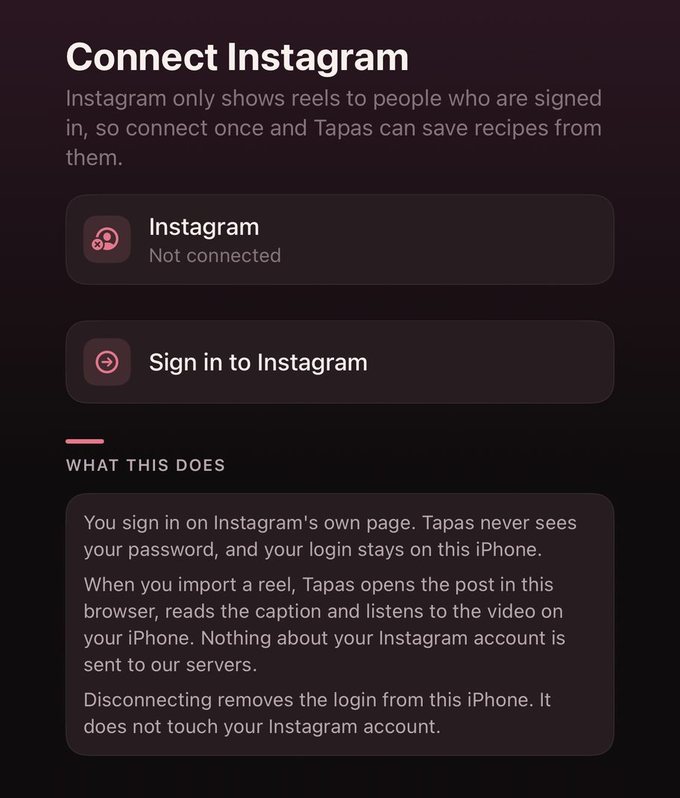
The first time you save a reel, Tapas may ask you to connect Instagram. That's because Instagram shows most reels only to people who are signed in. You sign in once, on Instagram's own page inside Tapas, and your login stays on your iPhone. You'll find it under Settings, then Connect Instagram.
After that, the reel's recipe lives in your cookbook next to the ones you saved from TikTok or websites, and you can find it again by searching for its name. If you're cooking it for six instead of four, change the servings and the amounts change with it. If you'd like to plan a week around it, we've written up how a week of recipes turns into one grocery list.